Class and ID
Classes and ID allows to attach a label to HTML elements. This label can be used in the CSS to refine the selection of a subset of elements.ID
ID are used to identify a unique element (The ID should be unique in the entire webpage). For instance an element <p> with an id label is defined in the HTML as<p id="label"> Some text </p>
ex.
#label {
  color: red;
}
Classes
Classes are used to identify a subset of element, and at the opposite of ID, may be reused on different elements. Example of <p> and <h1> elements with a class<h1 class="label"> My title </h1>
ex.
.label {
  color: red;
}
Note: you can define several classes for one HTML element (ex. class='label1 label2').
Application
Consider the following code<p class="c1"> Value A </p> <p class="c2"> Value B </p> <p class="c1"> Value C </p> <p class="c1 c2"> Value D </p> <p> Value E </p>
p {
  margin: 10px;
  padding: 10px;
}
XX {
  background-color: lightgray;
}
YY {
  font-weight: bold;
}
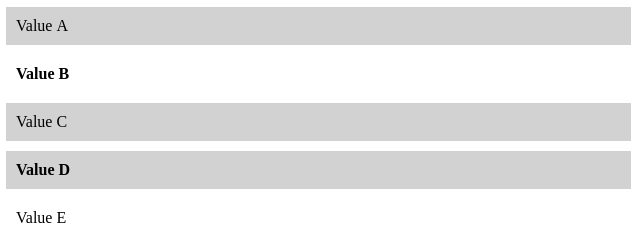
Selectors with classes
Classes can be combined with names of elements to refine the selection. Given an html element e and classes c, the CSS selector e.l selects only elements e with the class l. Examples (make sure to understand well their differences):- - e.label: Select all elements e with the class label (note that there is no space between e and .label).
-
- <e class="label"> ... </e>
- - e .label: Select all elements with a class a class label which are children of an element e (note the space between e and .label).
-
- <e> <anytag class="label"> ... </anytag> </e>
- - e, .label: Select all e elements, and all elements with class label.
- In case of conflict: ID have higher priority than classes (inline style has even higher priority than ID).
> Explain in plain text which elements would be selected by these selectors
h1.main, .second
h2 .main, #selected, p em.red
body p.selected strong
Pseudo classes
Pseudo-classes are used to define a state of an element, for instance to indicate when the user pass the mouse over the element. Pseudo classes allow CSS to interact (in a limited way) with the action of the user. Pseudo classes are used by default on link element <a> that change color when the mouse passes over it, and once the link has been visited. Pseudo classes can however be used on any elements using CSS. Experiment with the following examples HTML<a href="https://www.polytechnique.edu/"> Link </a>
body {
  text-align: center;
  font-size: 200%;

}
a {
  color: blue;
  text-decoration: none; /* take away the default underline */
}

/* The mouse is over the element */
a:hover {
  color: red;
  font-weight: bold;
}

/* The mouse click on the element */
a:active {
  background-color: black;
}
Exercises
Menu
Considering the following HTML body code to model a menu, create the associated CSS that mimics the following appearance.<a id="selected" href=""> Home </a> <a href=""> News </a> <a href=""> Contact </a> <a href=""> About </a>